Codex 登录报错:token_exchange_failed#
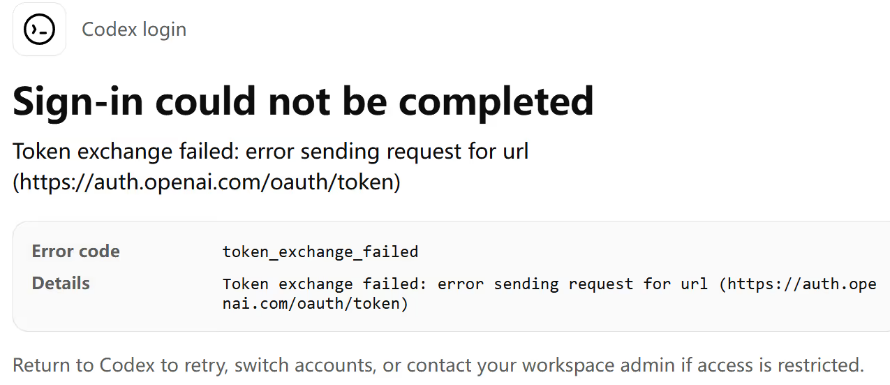
下载 Windows 版 Codex 后,进行账号登录,跳转浏览器授权回调后,页面卡住,返回客户端直接报错:
1
2
3
| Sign-in could not be completed
Token exchange failed: error sending request for url (https://auth.openai.com/oauth/token)
Error code: token_exchange_failed
|
全局代理环境变量:
1
2
3
| HTTP_PROXY=socks5://127.0.0.1:1080
HTTPS_PROXY=socks5://127.0.0.1:1080
ALL_PROXY=socks5://127.0.0.1:1080
|
- 系统所有网络请求(包括本地
localhost:1455 登录回调)全部走代理; - Codex 本地监听 1455 端口等待浏览器回调请求,但请求被代理拦截转发;
- 本地服务收不到回调请求,授权令牌无法交换,直接抛出
token_exchange_failed;
1. 在 PowerShell 添加 NO_PROXY 环境变量#
以普通 PowerShell 执行,适配代理端口 1080:
1
2
3
4
| [Environment]::SetEnvironmentVariable("HTTP_PROXY", "socks5://127.0.0.1:1080", "User")
[Environment]::SetEnvironmentVariable("HTTPS_PROXY", "socks5://127.0.0.1:1080", "User")
[Environment]::SetEnvironmentVariable("ALL_PROXY", "socks5://127.0.0.1:1080", "User")
[Environment]::SetEnvironmentVariable("NO_PROXY", "localhost,127.0.0.1,::1,192.168.0.0/16,10.0.0.0/8", "User")
|
或者直接添加环境变量也可以
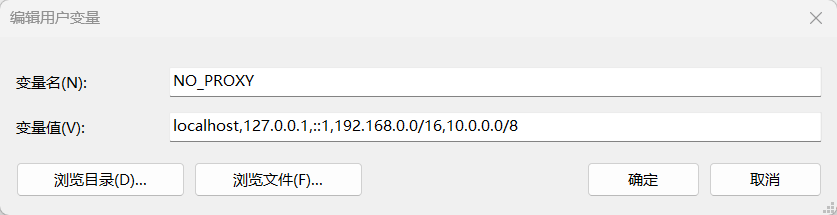
2. 重启电脑#
Windows 桌面客户端不会实时读取环境变量,必须重启电脑才能让 Codex 读取到新的 NO_PROXY 配置。
再登录 Codex 就可以了